
Big power doesn’t always come in a giant box—sometimes it fits right in the palm of your hand. Mini PCs have gone from niche curiosities to serious desktop replacements, packing impressive performance into compact, clutter-free designs. But which one is actually worth your desk space, gaming sessions, or creative workloads? In this video, we’re diving into the BEST Mini PCs available right now—whether you want raw speed, silent efficiency, or budget-friendly brilliance. Stick around, because by the end, you’ll know exactly which pint-sized powerhouse deserves to sit on your setup.
Top 5 Mini PCs:
1. MINISFORUM Venus UM790 Pro Mini PC

Power in a small box is what you get with the MINISFORUM Venus UM790 Pro Mini PC. This compact system, powered by the AMD Ryzen 9 7940HS processor, delivers blazing-fast performance that rivals larger desktops. You will notice the 8 cores and 16 threads fly through multitasking without lag, while the AMD Radeon 780M GPU handles demanding graphics smoothly.
Speed stands out with 32GB DDR5 memory and a 1TB PCIe4.0 SSD. You can run apps, edit media, and transfer files quickly than most mini PCs in this class. Dual-channel support and RAID options give flexibility for both performance and data protection. Cold Wave 2.0 cooling with liquid metal ensures the machine stays quiet and stable during long sessions, which impressed me the most.
Connectivity shines with dual USB4 ports, four USB3.2, dual HDMI 2.1, and 2.5Gb Ethernet. You can hook up multiple 4K displays for work or play with zero fuss. Wi-Fi 6E and Bluetooth 5.3 add rock-solid wireless connections for smooth streaming and device pairing.
Portability and power in this unit beat many rivals, though the need for a 65W PD supply on USB4 feels limiting. Overall, this mini PC delivers outstanding performance in a sleek, efficient package.
2. Apple 2024 Mac mini

Small size meets huge performance in the Apple 2024 Mac mini. This desktop, powered by the M4 chip with a 10-core CPU and 10-core GPU, runs faster and smoothly than earlier models. You can feel the snappy response whether opening heavy apps or handling multitasking.
Connections get easier thanks to Thunderbolt, HDMI, Gigabit Ethernet, and front-facing USB-C ports. For the first time, you also get a headphone jack on the front, which adds real convenience compared to older versions. With 16GB unified memory and a 256GB SSD, everyday tasks and creative work stay fluid without delays.
Apple Intelligence integration impressed me the most. It boosts productivity with writing, organizing, and assistance features, all while protecting your privacy. Apps like Microsoft 365 and Adobe Creative Cloud perform at speeds that beat many Windows mini PCs. If you own an iPhone, seamless features like mirroring and FaceTime calls from the Mac feel like pure magic.
Compact design at five by five inches makes it easy to place anywhere, and Apple’s carbon-neutral commitment adds peace of mind. One limitation is the base 256GB storage, which feels tight if you store large files. Overall, this Mac mini delivers incredible speed in a tiny package.
3. GMKtec M5 Plus

Power and portability collide in the GMKtec M5 Plus Gaming Mini PC. With its AMD Ryzen 7 5825U processor, this system easily outperforms earlier 7430U or 5700U models, making productivity and gaming smooth. You can switch between quiet and performance modes in BIOS, giving flexibility that few compact PCs provide.
Speed becomes clear with 32GB DDR4 RAM and a 1TB PCIe SSD, which keep apps fast and responsive. Expansion up to 64GB RAM and dual SSD slots reaching 4TB make it more versatile than many rivals. What impressed me most was the dual NIC LAN 2.5GbE ports, which offer faster and more stable wired connections than typical mini PCs.
Graphics capability shines with AMD Radeon 8-core GPU, driving triple 4K displays at 60Hz for editing, gaming, or design. Connectivity feels modern, with USB3.2, USB-C, DisplayPort, HDMI 2.0, and a 3.5mm audio jack covering every need. Wi-Fi 6E and Bluetooth 5.2 add wireless reliability with lower latency than older standards.
Warranty support from GMKtec adds confidence, and the compact form factor fits anywhere. One drawback is the PCIe 3.0 SSD, which trails newer PCIe 4.0 options in speed. Overall, this mini PC balances strong performance and rich features at an excellent value.
4. Beelink SER8 Mini PC

Powerful performance meets compact design in the Beelink SER8 Mini PC. Running on the AMD Ryzen 7 8745HS with Radeon 780M graphics, this system handles demanding games and creative tools better than many rivals in its class. You get smooth multitasking with 8 cores and 16 threads, plus speeds up to 4.9GHz.
Memory capacity impresses with 32GB DDR5 at 5600MHz, expandable up to 256GB. Storage is equally strong, with a 1TB PCIe4.0 SSD expandable to 8TB, which puts it ahead of most mini PCs. Fast load times and massive storage make this machine ideal for both work and entertainment. What stood out most for me is the ability to run a 4K@144Hz triple display setup using HDMI 2.1, DP1.4, and USB4 ports—something few small desktops can match.
Wireless performance stays reliable with 2.4Gbps WiFi 6 and Bluetooth 5.2, ensuring stable connections for streaming and accessories. Cooling design also feels premium, with a steam chamber and metal casing keeping the unit quiet under heavy use. Certifications and added features like Wake on LAN show attention to detail.
One drawback is its slightly higher price compared to similar DDR4-based models. Overall, this SER8 Mini PC delivers unmatched speed, graphics, and expandability in a tiny footprint.
5. GEEKOM IT13 Mini PC
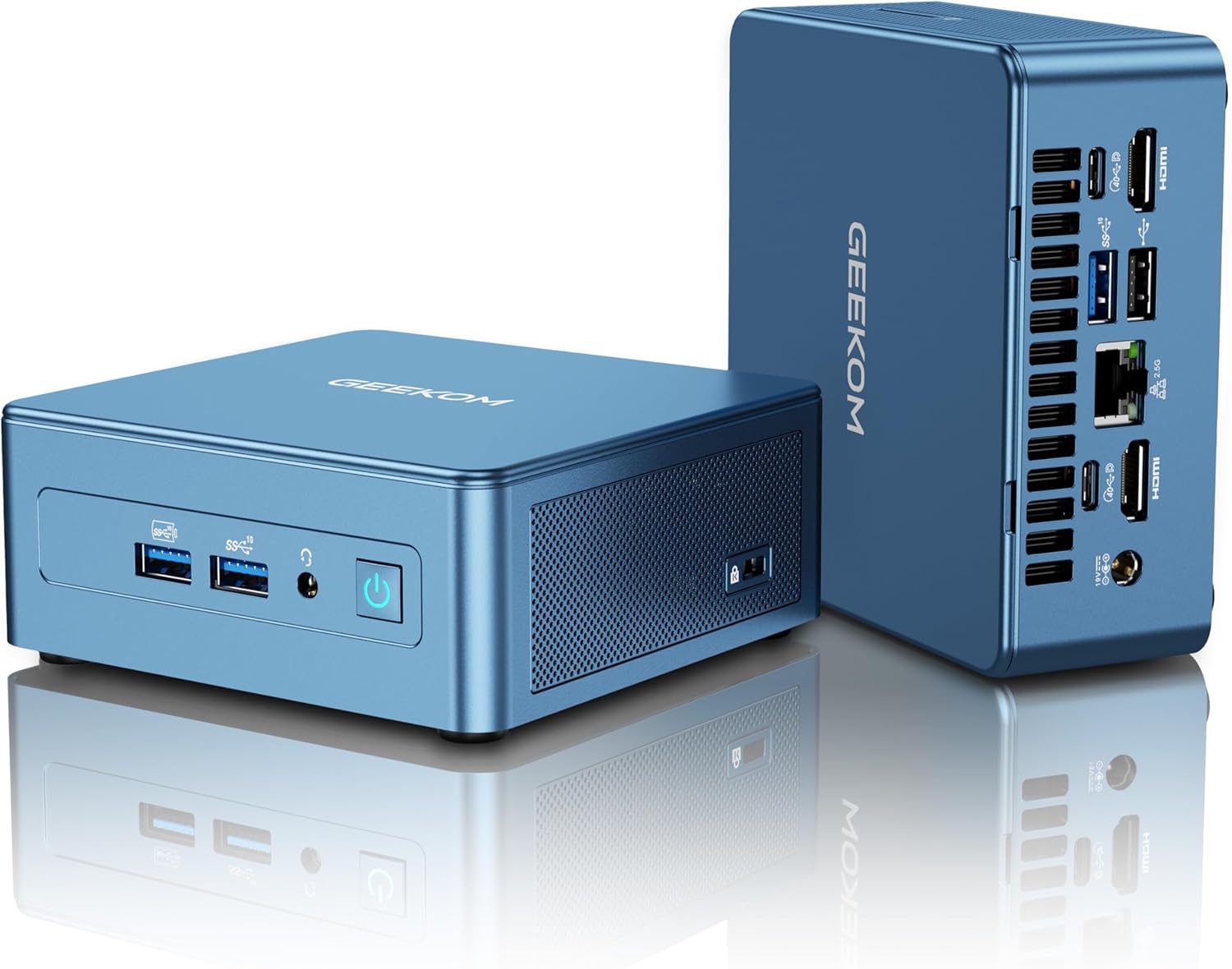
Raw desktop-class speed in a compact form defines the GEEKOM IT13 Mini PC. Running on Intel’s i9-13900HK with 14 cores and 20 threads, this 2025 edition outpaces many competing mini PCs, especially in creative workloads. You feel the 10% uplift over the i9-13900H when juggling heavy multitasking or demanding software.
Memory performance shines with 32GB of 3200MHz RAM, expandable to 64GB, while the 1TB NVMe PCIe Gen4 SSD delivers rapid load times and smooth workflows. Extra storage slots support multiple drives, giving flexibility unmatched by most rivals in this size class. What impressed me most was the 8K UHD quad-display capability with Intel Iris Xe Graphics, which allows dual 8K and dual 4K setups simultaneously.
Connectivity excels with dual USB4, HDMI 2.0, and future-ready support for eGPUs and high-speed storage. Networking feels equally strong thanks to WiFi 6E, Bluetooth 5.2, and 2.5Gb Ethernet, offering fast and stable connections across every use case. Cooling performance also stands out, cutting noise while keeping the system efficient during long sessions.
Sustainability certification gives added confidence for eco-conscious buyers. One drawback is the 3200MHz RAM speed, which trails DDR5 in newer competitors. Overall, this GEEKOM mini PC blends raw power, expandability, and next-gen display support in a premium design.
Best Mini PC: A Complete Buying Guide
Introduction
Mini PCs have taken the tech world by storm, redefining what it means to have a powerful, compact computing experience. Once, a fully functioning desktop meant a large tower, endless cables, and the need for plenty of desk space. Today, mini PCs offer similar—sometimes superior—performance in a form factor that can fit in the palm of your hand. They pack the essentials of productivity, entertainment, and even gaming into sleek, efficient, and portable devices.
Why does this matter? Because modern life demands flexibility. Many people want computers that can handle remote work during the day and entertainment at night, all while taking up minimal space. Students in dorm rooms, professionals on the go, small businesses, and home theater enthusiasts all stand to benefit from a mini PC’s convenience. Their reduced footprint doesn’t just save space—it also often results in lower energy consumption, quieter operation, and greater versatility when compared to bulky desktop systems.
A mini PC can become the heart of your workstation, your media center, or even your travel companion. It’s especially valuable if you juggle multiple roles—switching from work spreadsheets to Netflix marathons, or from coding projects to photo editing, all without missing a beat. Many models even allow you to upgrade RAM or storage, extending their usefulness for years.
Furthermore, mini PCs have become affordable across a wide range of budgets. Whether you’re seeking a budget-friendly option for basic browsing, a mid-range machine for productivity and creative work, or a high-end system capable of handling 3D modeling and modern gaming, there’s a mini PC for you.
Another key advantage is portability. For digital nomads, IT professionals, or even families who want a shared system that moves easily between rooms, mini PCs make life easier. They’re light enough to slip into a bag, yet powerful enough to run software you’d typically expect only from a desktop.
Mini PCs are also greener than traditional desktops. Many consume significantly less power, which helps lower electricity bills and reduces environmental impact. With the rise of remote work and hybrid setups, their energy efficiency is becoming even more appealing.
Whether you’re after a sleek office computer, a gaming-ready powerhouse, or a dedicated home theater device, the best mini PC will elevate your digital lifestyle. This guide will walk you through the types available, key features to look for, important buying considerations, and how to keep your investment running smoothly. By the end, you’ll know exactly how to choose the right mini PC to match your needs.
Types of Mini PCs
Mini PCs aren’t one-size-fits-all. Depending on what you need them for, they come in different types with unique strengths.
1. Basic Mini PCs
These are entry-level systems designed for everyday tasks like web browsing, streaming, word processing, and light productivity. They’re often affordable and energy-efficient, making them a great choice for students, casual users, or households needing a shared device.
Best for: Those who want a compact and budget-friendly computer for light use.
2. Business Mini PCs
Tailored for professionals, these models often include features like enterprise-level security, multiple connectivity options, and reliable performance for multitasking. They’re built with durability in mind, ensuring smooth operation in office environments.
Best for: Professionals, small businesses, and anyone needing a reliable work computer.
3. Gaming Mini PCs
Designed for high performance, gaming mini PCs pack dedicated graphics cards, fast processors, and upgradeable components into compact enclosures. They can run modern games at high settings while still saving space compared to traditional gaming rigs.
Best for: Gamers who want desktop-level performance without the bulky setup.
4. Home Theater Mini PCs (HTPCs)
These mini PCs are optimized for streaming, 4K video playback, and connecting to home entertainment systems. With HDMI ports, quiet cooling systems, and sleek designs, they blend seamlessly into living rooms.
Best for: Movie lovers, streamers, and anyone building a home entertainment center.
5. Creative/Workstation Mini PCs
These are built for designers, video editors, programmers, and creators who need serious processing power in a small footprint. They often feature powerful CPUs, large RAM capacities, and high-speed SSDs.
Best for: Content creators, engineers, and professionals working with demanding software.
Key Features to Look For
1. Processor (CPU)
The CPU is the brain of your mini PC. Intel Core i5/i7 or AMD Ryzen 5/7 chips are ideal for multitasking and demanding workloads, while entry-level Intel Celeron or Atom processors may suffice for browsing and light tasks.
Why it matters: A faster CPU ensures smoother performance across applications and future-proofs your system.
2. Memory (RAM)
RAM dictates how well your mini PC handles multitasking. Basic systems work fine with 4GB–8GB, while professional or gaming setups often need 16GB or more.
Why it matters: More RAM means better performance for heavy workloads and running multiple apps simultaneously.
3. Storage
Mini PCs typically offer SSDs, which are faster and more reliable than HDDs. Some allow dual storage (SSD + HDD) for speed and capacity. Look for NVMe SSDs for the best performance.
Why it matters: Faster boot times, quicker file access, and smoother performance overall.
4. Graphics (GPU)
For gaming and creative work, a dedicated GPU is essential. Entry-level users may only need integrated graphics.
Why it matters: Determines your ability to game, edit videos, or handle graphic-intensive tasks.
5. Connectivity Options
Look for multiple USB ports, HDMI/DisplayPort for monitors, Ethernet, and Wi-Fi 6 for stable connections. Thunderbolt support is a bonus for faster data transfers.
Why it matters: Connectivity ensures compatibility with all your peripherals and accessories.
6. Upgradeability
Some mini PCs allow RAM and storage upgrades, which is crucial for extending lifespan and adapting to future needs.
Why it matters: Protects your investment and offers long-term flexibility.
7. Cooling System
Efficient cooling prevents overheating and ensures quieter operation. Fanless designs are ultra-quiet but may sacrifice performance.
Why it matters: Longevity and performance depend on effective cooling.
8. Operating System
Many mini PCs come preloaded with Windows, Linux, or ChromeOS, while some arrive as barebones kits requiring you to install your own OS.
Why it matters: Determines ease of setup and compatibility with your workflow.
Things to Consider Before Buying
Budget
Mini PCs range from under $200 for basic models to over $1000 for gaming or professional workstations. Decide what tasks you’ll prioritize before spending.
Size/Space
Even within mini PCs, sizes vary. Some are pocket-sized, while others are shoebox-sized. Consider where you’ll place it—desk, living room, or on the go.
Ease of Use
Pre-built systems are plug-and-play, while barebones kits require technical knowledge to install RAM, storage, and OS. Beginners may prefer ready-to-use models.
Pros and Cons
| Pros | Cons |
|---|---|
| Compact and space-saving | Limited upgrade options compared to full desktops |
| Energy-efficient and quieter | High-performance models can be expensive |
| Portable and versatile | May lack advanced cooling for heavy workloads |
| Wide range of options for all budgets | Some models require DIY setup (barebones) |
Step-by-Step Buying Guide
1. Research Your Needs
Identify your main use case—are you gaming, streaming, working, or just browsing? This will narrow your choices dramatically.
2. Compare Products
Check reviews, benchmarks, and specifications. Pay attention to upgradeability, connectivity, and real-world performance.
3. Finalize Your Choice
Choose a trusted retailer, verify warranties, and ensure customer support is available. Look out for deals around shopping seasons for added savings.
Maintenance Tips
-
Keep it dust-free: Regularly clean vents and fans to prevent overheating.
-
Update software: Install OS and driver updates to improve stability and security.
-
Use a UPS (Uninterruptible Power Supply): Protects against sudden power outages that can damage components.
-
Avoid overloading: Don’t run heavy tasks beyond the device’s capacity—it shortens lifespan.
Common Issues and Troubleshooting
-
Overheating: Clean dust buildup, improve ventilation, or add external cooling.
-
Slow performance: Upgrade RAM/SSD if possible or clear unnecessary background apps.
-
Connectivity issues: Update drivers and check Wi-Fi/router compatibility.
-
System crashes: Ensure OS updates are installed and check for hardware faults.
Final Words
Choosing the best mini PC is about matching the right balance of power, size, and features to your needs. Whether you’re a student needing a study buddy, a professional seeking a reliable workstation, a gamer demanding performance, or a movie enthusiast building a home theater, there’s a perfect option waiting for you.
Prioritize the features that matter most—processor, RAM, storage, and connectivity—while keeping your budget and future upgrade potential in mind. A well-chosen mini PC won’t just save space; it will enhance productivity, entertainment, and convenience in ways a bulky desktop never could.