

Speed matters in gaming, and a sluggish storage drive can hold you back. That’s where an M.2 NVMe SSD makes all the difference. With faster load times, smoother gameplay, and near-instant boot-ups, these SSDs give your gaming rig the boost it needs. But with so many options, how do you choose the right one? Whether you want top-tier speed, reliable endurance, or the best value for your budget, the right NVMe SSD can level up your experience. This guide breaks down the best picks, helping you find the perfect match for your gaming setup. Say goodbye to long loading screens and hello to faster, more responsive gameplay. Let’s dive in and find the best M.2 NVMe SSD for you!
Top 5 M.2 NVMe SSDs for Gaming
1. SAMSUNG 990 PRO SSD NVMe M.2 PCIe Gen4

Power up with the Samsung 990 PRO Gen4 SSD. This NVMe M.2 SSD delivers lightning-fast performance, making it perfect for hardcore gamers and tech enthusiasts alike. With up to 7450/6900 MB/s read and write speeds, the 990 PRO pushes PCIe 4.0 to near max capability, putting it leagues ahead of the previous 980 PRO model. It even boasts a 55% improvement in random performance, so heavy computing and rapid loading times are its forte.
Switching from the 980 PRO? You’ll notice a huge upgrade in power efficiency—up to 50% more effective per watt. And with storage options from 1TB to a whopping 4TB, there’s plenty of space for your games, video projects, or data analytics tasks. Samsung’s intelligent heat control also means it maintains peak speeds without excessive power drain or thermal throttling.
Samsung, a leader in flash memory, ensures consistent top-tier performance through its smart in-house controller and Turbo Write technology. This SSD isn’t just about raw speed; it’s designed for sustained power efficiency and superior heat management, which I found to be perfect for intense, continuous usage. In short, if you’re after an upgrade that combines speed, efficiency, and massive storage, the Samsung 990 PRO Gen4 SSD truly excels.
2. Crucial New 2024 T705 1TB PCIe Gen5 NVMe M.2 SSD

The Crucial T705 1TB Gen5 SSD is a powerhouse. With speeds up to 13,600MB/s for reads and 10,200MB/s for writes, this NVMe M.2 SSD is perfect for heavy-duty gaming, 3D rendering, and video editing. You’ll load AAA titles up to 15% faster than with Gen4 drives, making it an ideal upgrade for anyone who demands peak performance.
Its copper-clad label ensures efficient heat transfer, especially when paired with a motherboard heatsink, keeping everything cool during intense workloads. Plus, the Micron 232-layer TLC NAND makes it ready for the latest Intel Core and AMD Ryzen CPUs, so you can pair it with top-of-the-line processors without worry.
This SSD excels in random read and write operations, reaching up to 1,400K/1,750K IOPS, which means smoother, lag-free multitasking across demanding applications. I especially appreciate the one-month Adobe Creative Cloud All-Apps subscription that comes with it—perfect for creatives tackling UHD or 8 K+ video files.
Installing it in your M.2 slot is simple, and the experience of faster texture renders and reduced load times really takes performance up a notch. For gamers, content creators, or professionals who work with large data files, the Crucial T705 delivers next-level speed and efficiency in a compact design.
3. WD_BLACK 2TB SN850X NVMe Internal Gaming SSD

The WD_BLACK SN850X 2TB SSD powers up your gaming PC with speeds up to 7,300 MB/s, creating lightning-fast load times. Equipped with Western Digital TLC 3D NAND, it offers the freedom to download more games without deleting your top picks. An optional heatsink keeps things cool during those intense gaming marathons, which makes a real difference in performance stability.
You can customize the experience with the WD_BLACK Dashboard, available for Windows, which monitors drive health and optimizes settings with Game Mode 2.0 for smoother gameplay. The Game Mode 2.0 really shines, automatically adjusting performance for minimal lag and cutting down texture pop-ins. I found this especially helpful in open-world games, where it kept visuals sharp and consistent.
With a capacity range up to 8TB, this SSD adapts to serious storage needs and future game downloads. Advanced features like Predictive Loading and Adaptive Thermal Management further enhance responsiveness and reduce overheating, keeping gameplay smooth.
Supporting Microsoft DirectStorage, it’s clear that the SN850X delivers purpose-built gaming performance. It stands out as a high-capacity, reliable choice for gamers wanting to minimize lag and optimize in-game responsiveness. If you’re aiming for peak performance with zero compromises, this SSD keeps you ahead of the game.
4. Addlink A93 2TB Gaming PC PS5 SSD with Heatsink
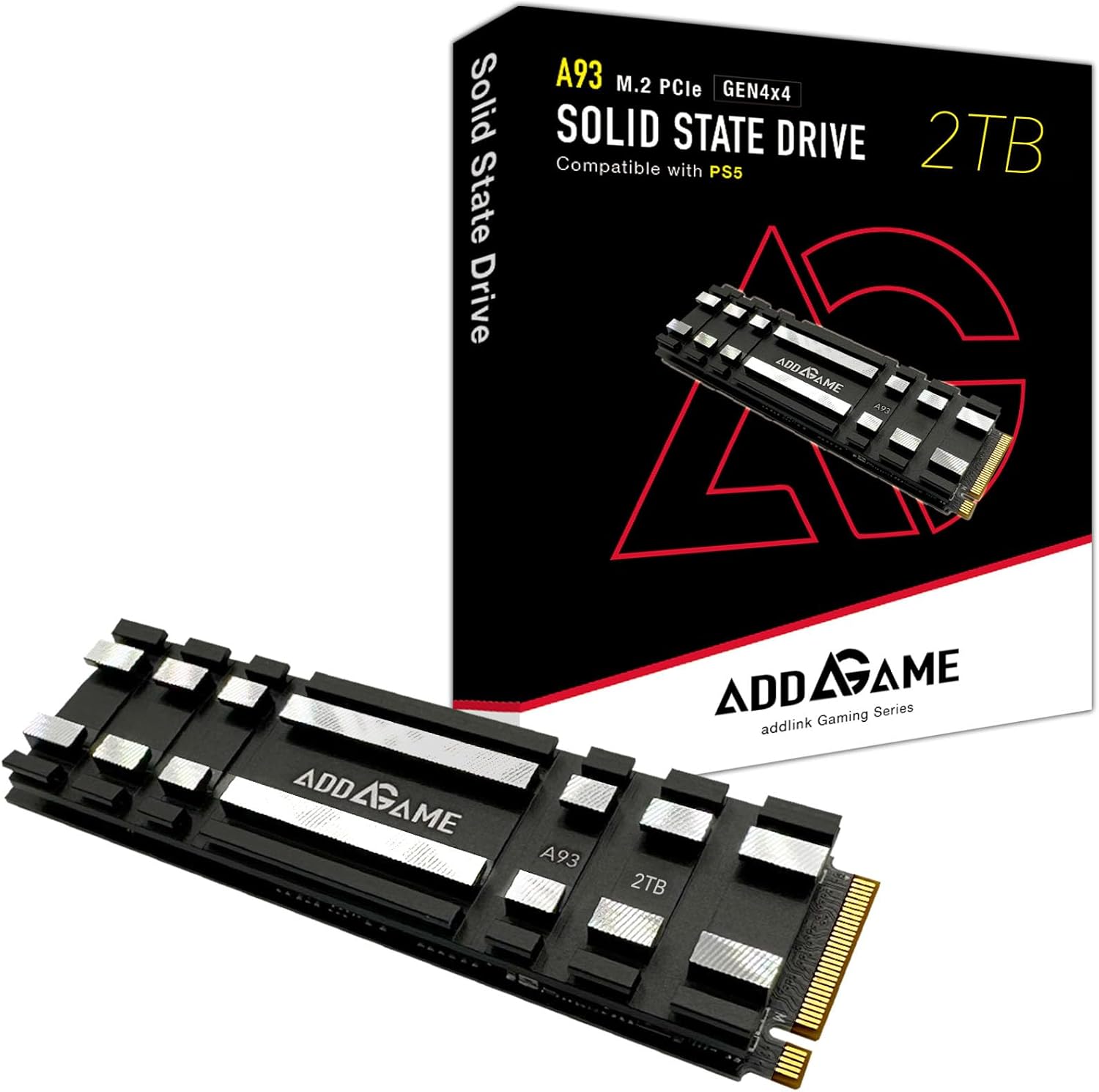
Experience smooth, high-speed gaming with the Addlink A93 2TB SSD. Reaching impressive read/write speeds of 7400/6500 MB/s, this SSD gives both PC and PS5 users a serious boost in performance. Thanks to its heat-conducting gel pad and aluminum heatsink, it stays cool under pressure, especially useful for intense gaming sessions.
The A93 is built with advanced TLC 3D NAND, making it both fast and durable. Supporting SLC Cache and Host Memory Buffer (HMB), it handles demanding applications effortlessly. This SSD is compatible with Intel and AMD Ryzen systems, as well as NVIDIA GeForce RTX 4090 setups, so it fits seamlessly into a range of high-performance builds. I love its versatility—installing it in a PS5, PS5 Slim, or even the ROG Ally X feels as easy as plug-and-play.
Addlink adds advanced flash management, including wear leveling and thermal throttling, which extends the life and stability of your drive. In my experience, the A93’s smart thermal controls keep it steady, even when running graphically intensive games.
For gamers wanting speed, reliability, and excellent thermal control, the Addlink A93 is a top contender that’s easy to install and ready to perform.
5. SK hynix Platinum P41 1TB PCIe NVMe Gen4

Meet speed redefined with the SK hynix Platinum P41 1TB Gen4 SSD. Hitting read speeds up to 7,000 MB/s and write speeds up to 6,500 MB/s, this compact M.2 drive performs excellently across intense tasks. SK hynix’s HYPERWRITE cache technology keeps data flowing seamlessly, whether gaming or working on demanding applications.
You’ll appreciate its power efficiency, which keeps your system cooler and more stable than comparable models. Reliability shines here, backed by 1,000 hours of HTOL stress testing and a 1.5-million-hour MTBF, giving you confidence for long-term use. In my experience, this SSD’s stability provides peace of mind, especially under heavy loads.
It’s compatible with multiple devices and installs easily with the included Macrium cloning software, so migrating data is a breeze. And with SK hynix’s premium 176-layer NAND flash, this internal drive combines high performance with efficiency—ideal for users who value both speed and durability.
Powered by a global memory leader, this SSD balances speed and reliability in one compact package. For those seeking a solid upgrade in both performance and efficiency, the Platinum P41 shines as an outstanding choice for gaming and high-performance computing.
The Ultimate Buying Guide For The Best M.2 NVMe SSD for Gaming
Introduction
When it comes to gaming, speed is everything. From reducing game load times to improving system responsiveness, the right storage solution can make a world of difference. Traditional hard drives and even SATA SSDs struggle to keep up with the demands of modern gaming. Enter the M.2 NVMe SSD—a game-changing storage solution that offers lightning-fast speeds, superior performance, and an overall enhanced gaming experience.
But with so many options on the market, how do you choose the best M.2 NVMe SSD for gaming? This guide will walk you through everything you need to know, from different types of SSDs to key features, selection tips, and maintenance practices to ensure longevity.
Types of M.2 NVMe SSDs for Gaming
Not all M.2 NVMe SSDs are created equal. Understanding the different types will help you find the best one for your gaming rig.
1. PCIe 3.0 NVMe SSDs
These SSDs utilize the PCIe Gen 3 interface and offer read and write speeds of up to 3,500 MB/s and 3,000 MB/s, respectively. While not the latest generation, PCIe 3.0 SSDs remain a cost-effective and powerful choice for gaming.
2. PCIe 4.0 NVMe SSDs
PCIe 4.0 SSDs double the speed of their PCIe 3.0 counterparts, with read speeds exceeding 7,000 MB/s. These SSDs are ideal for next-gen gaming, offering seamless load times and optimal system performance.
3. PCIe 5.0 NVMe SSDs (Emerging Technology)
The latest and fastest M.2 NVMe SSDs operate on PCIe 5.0, reaching potential speeds of up to 14,000 MB/s. While currently expensive and limited in compatibility, they are the future of gaming storage.
4. DRAM vs. DRAM-less SSDs
- DRAM SSDs: Feature onboard memory for faster performance and reduced latency.
- DRAM-less SSDs: More budget-friendly but may experience slower random read/write speeds, affecting game loading performance.
5. Single-Sided vs. Double-Sided SSDs
- Single-sided: Better for ultrathin gaming laptops and compact builds.
- Double-sided: Often features higher storage capacities but may require more cooling.
Key Features to Consider
Before purchasing an M.2 NVMe SSD for gaming, it’s important to consider key performance and reliability factors.
1. Speed (Read/Write Performance)
Faster SSDs mean quicker game load times, reduced stutter, and an overall smoother experience. Look for:
- PCIe 3.0: At least 3,000 MB/s read speeds.
- PCIe 4.0: Around 7,000 MB/s for top-tier gaming.
2. Capacity
Gaming SSDs typically range from 500GB to 4TB. Consider:
- 500GB: Suitable for casual gamers with limited game libraries.
- 1TB: A balanced choice for most gamers.
- 2TB+: Best for those with large game collections or content creation needs.
3. Endurance (TBW – Terabytes Written)
The TBW rating indicates how much data can be written before performance degrades. Higher TBW means better durability.
4. Cooling Solution
Some high-speed SSDs come with built-in heatsinks, reducing thermal throttling and ensuring consistent performance.
5. Controller and NAND Type
- TLC (Triple-Level Cell): The best balance between speed, longevity, and cost.
- QLC (Quad-Level Cell): More affordable but slightly slower.
- MLC (Multi-Level Cell): Less common but offers superior durability.
6. Gaming Optimization
Some SSDs come with firmware and gaming-centric features like DirectStorage support (Windows 11) and game mode functionality for enhanced performance.
Step-by-Step Guide for Choosing the Best M.2 NVMe SSD for Gaming
Step 1: Check Your System Compatibility
- Verify your motherboard supports M.2 NVMe slots.
- Check for PCIe lane support (3.0, 4.0, or 5.0).
Step 2: Determine Your Storage Needs
- Consider your game library size and future storage expansion.
- Opt for at least 1TB if you play AAA titles regularly.
Step 3: Compare Performance vs. Budget
- PCIe 4.0 is ideal for high-performance gaming, but PCIe 3.0 remains a solid choice for budget-conscious gamers.
Step 4: Look for Gaming-Specific Features
- Heatsink support, DRAM cache, and DirectStorage optimization can make a difference in gaming performance.
Step 5: Check Reviews and Reliability
- User reviews and benchmark tests provide real-world insights into performance and durability.
Step 6: Choose a Trusted Brand
- Brands like Samsung, WD Black, Seagate FireCuda, and Kingston consistently deliver high-quality SSDs.
Maintenance Tips for Longevity
1. Keep Your SSD Cool
- Use a heatsink or ensure proper airflow in your gaming rig.
- Avoid exposing your SSD to high temperatures.
2. Enable TRIM Support
- Most modern OS automatically enable TRIM, which helps maintain SSD performance over time.
3. Avoid Excessive Writes
- Frequent overwriting can degrade SSD lifespan. Store large files on secondary drives.
4. Regularly Update Firmware
- Manufacturers often release updates to improve stability and speed.
5. Monitor Drive Health
- Use tools like CrystalDiskInfo or Samsung Magician to check SSD health and lifespan.
6. Optimize Storage Use
- Keep at least 10-15% free space for optimal performance and to prevent slowdowns.
Conclusion
Investing in a high-performance M.2 NVMe SSD is one of the best ways to enhance your gaming experience. Whether you opt for a PCIe 3.0 SSD for cost-effective performance or a PCIe 4.0/5.0 model for cutting-edge speed, choosing the right SSD depends on your system compatibility, budget, and gaming needs.
By considering factors like read/write speeds, endurance, cooling solutions, and firmware optimizations, you can ensure a smooth and immersive gaming experience with minimal loading times and maximum responsiveness. Don’t forget to maintain your SSD properly to enjoy top performance for years to come!
With the right M.2 NVMe SSD, your gaming rig will be ready to handle the most demanding titles with ease.